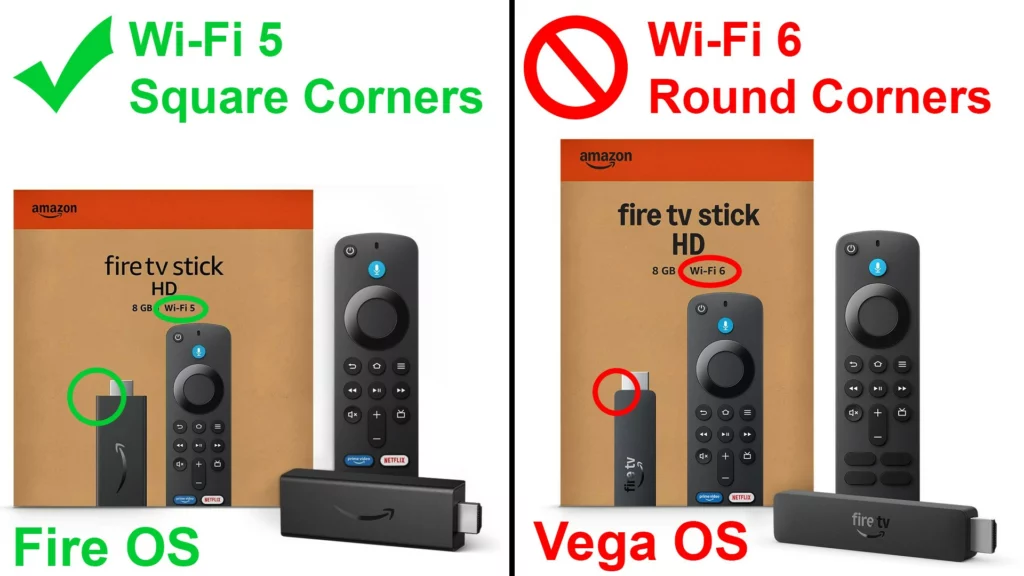
Amazon sells Fire TV Sticks with different operating systems. For example, the Fire TV Stick 4K Select runs Vega OS and the Fire TV Stick 4K Max (2nd generation) runs Fire OS. The full model name and generation matter when choosing an app or troubleshooting an update.
Find the full model name
Open Settings and look for the About section under My Fire TV or Device & Software. Menu wording can vary. Write down the model name and current software version. If the on-screen label is incomplete, check your order details or the original packaging.
Compare your model with Amazon’s list
Find the exact model in Amazon’s device specifications or software-update list. Check the suffix and generation, especially when comparing the 4K, 4K Select, 4K Plus and 4K Max.
Check app compatibility separately
Search for the app on the device itself and check the developer’s supported-device list if available. If the app is missing, confirm the operating system, app availability and region with the developer before buying or changing devices.